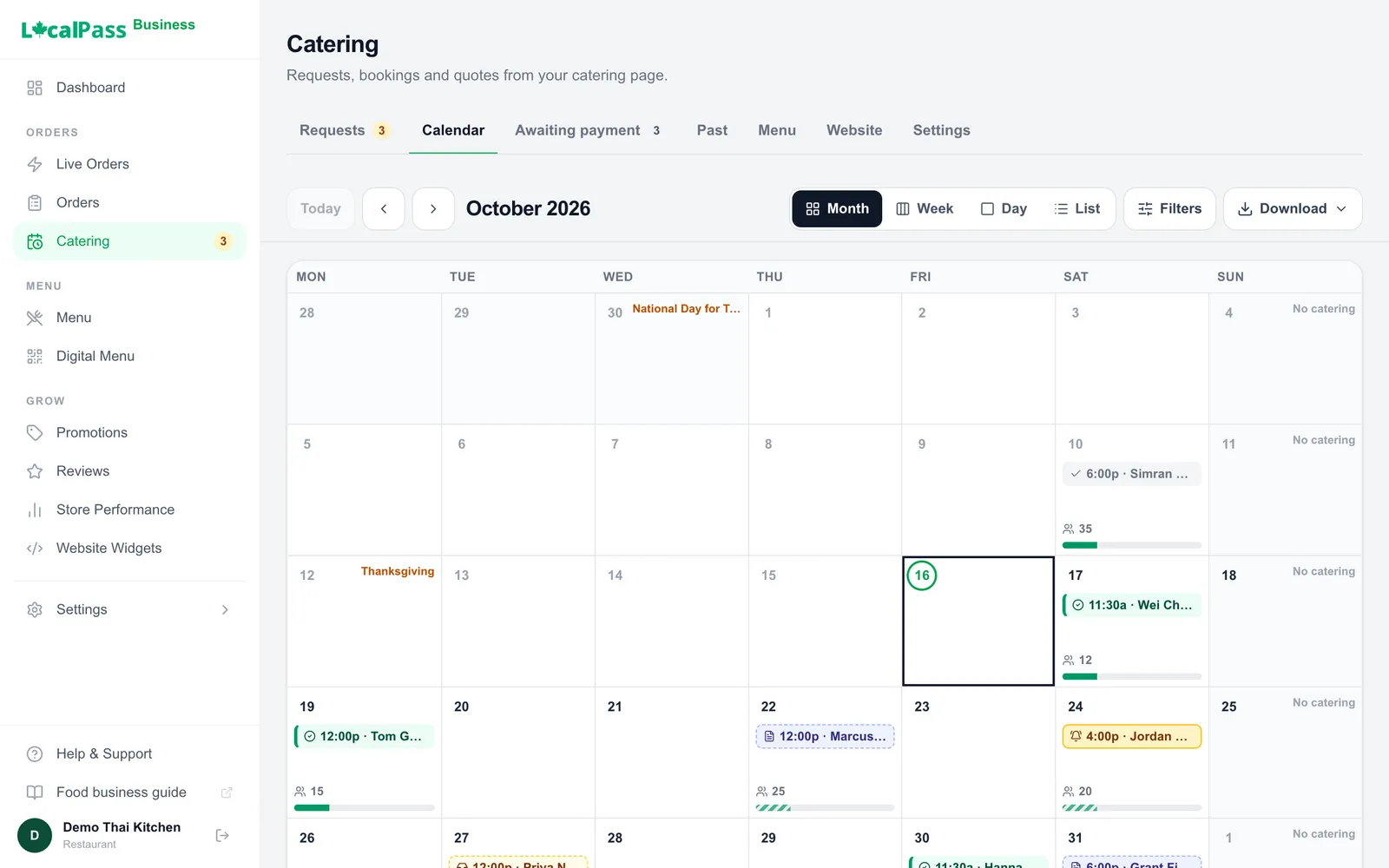
Your calendar, each event's deposit and balance, and the requests waiting for a quote.
25 guests, pad thai and satay: about a minute.
What your customers see
Ordering catering from you takes a minute
No forms or back-and-forth emails. Customers see every dish, size and price, and the total updates as they go.
1
Tell you about the event
Guests, date, pickup or delivery, dietary needs and allergies.
2
Pick the food
Trays, per-guest meals or a buffet from your courses. On a request, they can leave the choice to you.
3
Book it, or ask for a quote
Pay now if the order fits your rules, or send a request for you to quote, with a budget if they have one.
4
Invite their guests
They share a link. Guests reply, say what they can’t eat, and pick their dishes.
For restaurants, hotels and caterers
Restaurants
Catering calls come in during the dinner rush. Details land on a notepad, the quote goes out days later, and nobody’s sure the deposit came in.
A catering page beside your regular menu.
Requests arrive with the guests, date, dietary needs and allergies filled in, and a budget when they give one.
Have a private room or patio? Book it with the food.
Extra sales on slow days, with nothing new for your staff to learn.
Hotels and event venues
The room, the menu and the extras are three separate conversations, and the planner still has to find a photographer on their own.
Each room, hall or terrace at its own price, booked with the food.
Staff, set-up, tables and linens on the same booking, with one deposit to hold the date.
Recommend the photographer, florist or DJ you trust. Customers book them directly.
Catering businesses
Enquiries arrive by email, phone and a website form. Quotes live in one tool, invoices in another, the calendar in a spreadsheet.
A button and QR code for your website that open your catering page.
Took a request by phone? Start the quote yourself; your customer pays online.
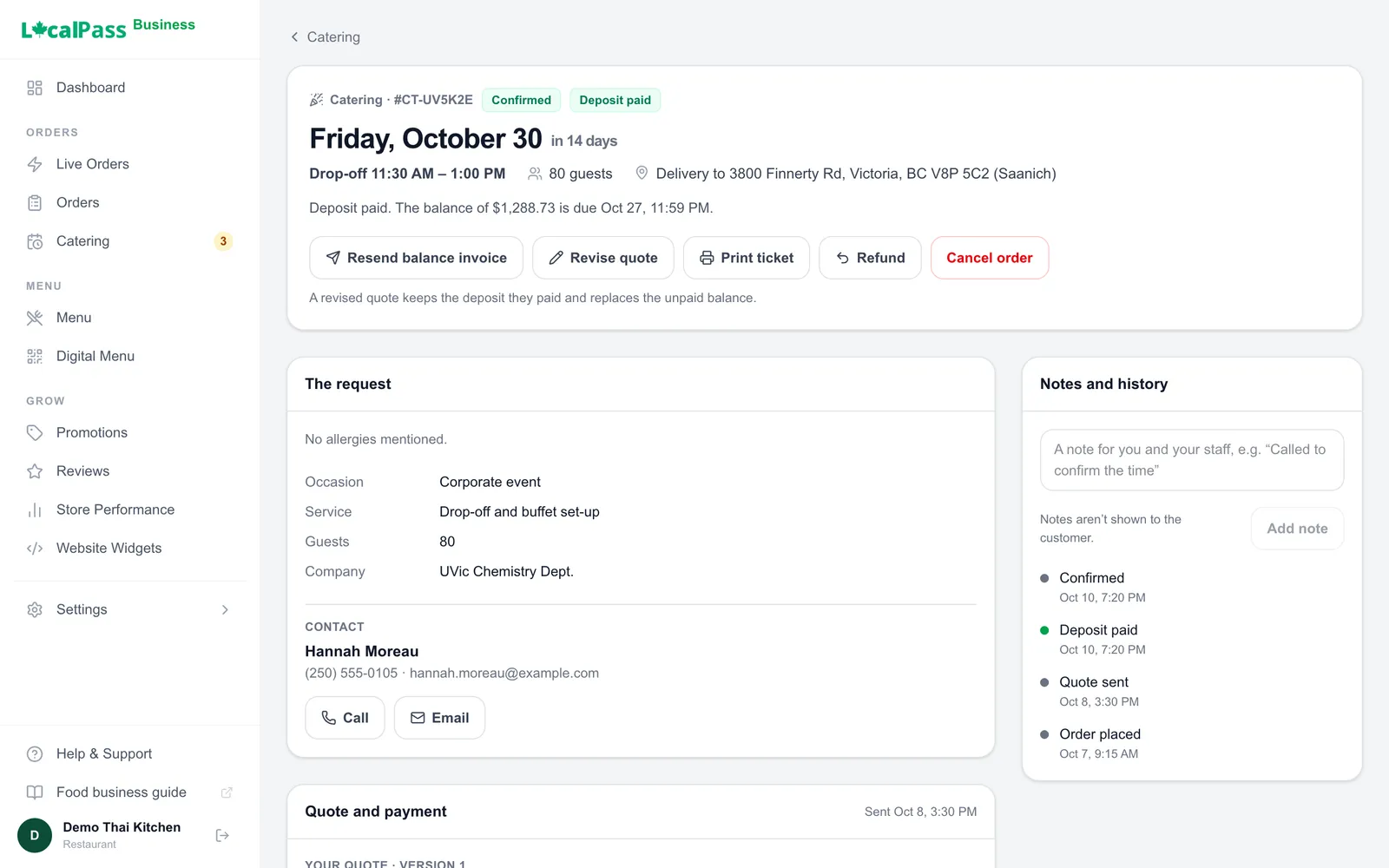
Every enquiry, quote, deposit and invoice in one place, on one calendar.
Invoices with your GST number and their company and PO number. Paid by cheque or e-transfer? Record it.
Everything catering needs, inside Local Pass
Catering sits beside your takeout and delivery, in the same payouts.
A catering menu of its own
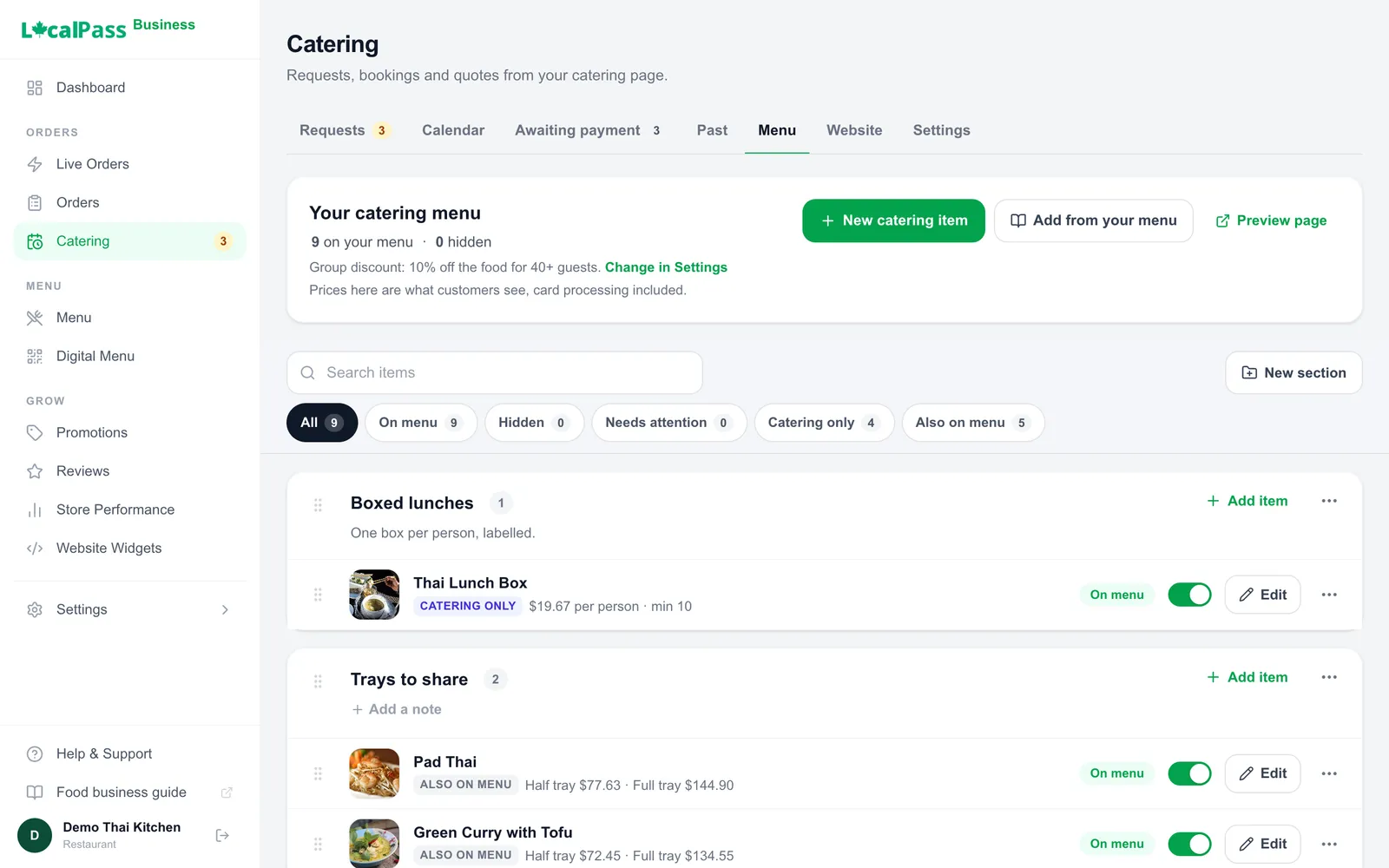
Trays in sizes, per-guest meals, and buffets with choices (“choose 2 mains”) or a set menu. Dishes show their photos and allergens. Catering-only items stay off your regular menu.
Help pricing a buffet
Add up the food, staff and supplies, pick your profit, and see what you’d keep after fees.
Book now, request a quote, or start one
Orders that meet your rules are paid on the spot; you confirm with one click. Others arrive as requests with the occasion and allergies, and a budget when they give one. Took one by phone? Start the quote yourself.
Quotes on one page
Start from a saved package or a past quote, then add dishes and extras like staff, clean-up or your room. Flags show when a quote is over budget or misses a dietary need, without blocking it.
Let them choose
Offer a few mains in the quote. Your customer picks before paying, and the total updates.
Deposits and the balance
Take a deposit on events far enough out, with the balance due before the event. Paying books the date. Refunds go back to the card.
Invoices a business can expense
Add your GST number once and every invoice shows it beside your business name, with your customer’s company and PO number when they give one. Paid by cheque, e-transfer or cash? Record it. Something extra after the event? Add the charge and its reason, and send the invoice.
Guest replies
Your customer invites guests with a link. You see who’s coming and the dietary totals, with names only beside an allergy. Allergies print on the kitchen ticket.
Every event on a calendar
Requests, bookings and unpaid quotes by month, week or day. Block days off, set a daily limit that warns you when a day is full, print the prep list, and add events to your calendar app.
Your space, booked with the food
List your private room, hall or patio at its own price. Customers add it to their order, or you add it to a quote, and it’s paid with the food.
Recommend people you trust
Show the photographer, florist, DJ or rentals company you work with, with a note and a link. Customers book them directly; Local Pass takes nothing.
A page that sells your catering
A cover photo, a gallery and videos of your spreads. Pickup, or delivery to the towns you choose at your fee.
business.localpass.ca/orders/…
Each booking: the request, your quote, and what's paid.
business.localpass.ca/orders/catering?tab=menu
Your catering menu, in sizes and per-person boxes.
Part of Victoria’s food scene for more than 30 years and now under new ownership, with a 100% halal kitchen — Italian-Greek comfort food alongside South Asian specialties, and catering for 100+ guests.
In your business portal, open Catering and follow three steps: the basics (notice, pickup and delivery), your first items, then preview and turn it on. Customers can’t book until you turn it on; then a Catering button appears on your business page.
How do requests and quotes work?
A customer describes the event and picks dishes or asks you to suggest a menu. You reply with a quote from your portal, and can offer options for a course. Nothing is charged until they pay; paying the quote or its deposit books the date. If someone calls or emails instead, start the quote yourself and they pay it online.
Can I take a deposit?
Yes. Set a percentage and how far out an event needs to be; the balance falls due a set number of days before. If a deposit isn’t paid by its due date, the booking can be cancelled and the date freed up.
What if a customer cancels?
You set the policy: free until a number of hours before the event, then the deposit is kept. Customers see it before booking, and your portal suggests the refund for you to confirm. Refunds go back to the card that paid.
How do I keep track of dietary needs and allergies?
Customers tell you when they book or ask for a quote, and your quote flags anything it misses. Invited guests can add their own; you see the totals, with a name beside every allergy. You set the allergens on your items, and Local Pass shows what you enter.
Can customers book my room or hall with the food?
Yes. Add each room, hall or patio as an extra with its own name and price. Customers add it when they book, or you include it in a quote, so one deposit holds the room and the food. Staff, set-up, clean-up and rentals work the same way. Alcohol can’t be billed through Local Pass; if your liquor licence covers catering, bill drinks yourself.
Can I recommend other businesses for the event?
Yes. List the photographer, florist, DJ, rentals or bar company you work with, with a note and a link. They show on your catering page, and customers book and pay them directly.
What does catering cost me?
The Local Pass fee is 5% of each catering order, at most $25, plus tax on the fee. Card processing is charged at what the card company charges us. By default your catering prices are marked up 3.5% to cover it, so customers see one all-in price; or you cover it yourself and they see your prices as entered. Nothing is added at checkout, and processing on a refunded payment isn’t returned. No setup fee or subscription. Card payments reach your balance when the customer pays and go out with your other sales. A payment you record as paid by cheque, e-transfer or cash stays yours; only the Local Pass fee on it, plus tax, comes off your next payout.
Is catering available in my city yet?
Local Pass is live in Greater Victoria, with Nanaimo, Duncan, Courtenay, Campbell River and Port Alberni rolling out. Sign up now and you’ll be ready when we reach your area.